You don't check it.
You notice it.
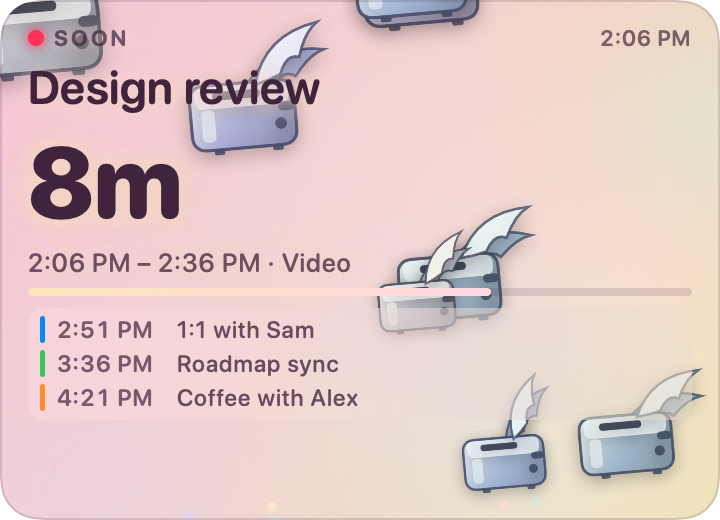
Mind is a small pastel window in the corner of your screen. When the day is clear it is a gradient and a couple of toasters drifting past. As a meeting closes in the flock thickens, the sky warms, embers start rising — and in the last two minutes it turns into fireworks. You never have to look at it directly.
Free · MIT · macOS 14+ · Universal · Notarized
That desktop is drawn and that panel is not a video. The sky is Mind's own particle model and the countdown is Urgency.evaluate, both ported to the browser — so dragging the scrubber does not step through mockups, it moves the clock, and the burst you get crossing a threshold is the same punctuation the app fires when your morning gets away from you.
Peripheral vision is the interface.
A notification interrupts you to say something you could have known for twenty minutes. Mind changes colour instead, and lets the part of your eye that is good at motion do the work the part that reads was going to be busy with.
It reads. That is all it does.
Two calls on EKEventStore: ask for access, fetch events. There is no code path in the app that creates, edits or deletes anything, no account to make and nothing that leaves the machine.
One number runs everything.
An intensity from 0 to 1, derived from how long until your next meeting. The colours, the flock, the embers, the fireworks and the tremor are all functions of that one value — which is why the thresholds are yours to move.
The escalation
Seven states, and you learn them by accident.
Nobody reads this table. You look up from something at 2:47 and the corner of the screen is orange and full of toast, and you know what that means before you have read a word of it — which is the entire design.
Each escalation fires a burst as punctuation, so a change of state catches your eye without a notification ever being posted.
Timing
Three numbers you own.
Mind ships with 60 minutes to wake up, 15 to get busy and 2 to panic. Those are guesses about your day, and they are almost certainly wrong for it — someone who needs ten minutes to find a room is not the person who joins from the same chair every time.
Move them and the ramp between them re-shapes. It is a smoothstep between the thresholds, not a step function, so the sky is always somewhere between two states rather than snapping from one to the next.
Defaults are 60, 15 and 2 minutes. The chart spans the whole 10-hour horizon — the cliff on the left is an event crossing into it — and the axis is square-rooted, because a linear one spends nine tenths of its width on the hours where nothing happens. Colours are Cotton, the default sky.
phase = .imminent
intensity = lerp(0.55, 0.88,
smoothstep(alert, critical, t))
One band of the curve, verbatim. Every band is the same three lines with different endpoints, which is why there is no fifth intensity hiding somewhere that the sliders cannot reach.
They stay in order for you
Push "get busy" past "wake up" and the app moves its neighbour rather than letting you build a set of thresholds that cannot all be true. The sliders here do the same.
The horizon is separate
Everything above happens inside a 10-hour window. Past it there is no next meeting as far as Mind is concerned, and the panel says so.
The panel
From a sliver to a board.
Drag the corner grip and the panel does not scale — it re-tiers. Nothing inside is a fixed point size; every metric is derived from the current bounds, and as the height crosses 108, 176 and 268 points a new row earns its place: the detail line, then the fuse, then as much of the rest of your day as fits.
All four are live, all four are eight minutes from the same meeting, and they are drawn here at their real point size — a Micro panel really is 200 × 92, which is about as much screen as a menu bar clock.
Drag anywhere to move it
The whole panel is the title bar. It floats on top, shows on all Spaces, and can be made click-through when you would rather it were scenery.
One genuinely useful click
If the next meeting has a video link — Zoom, Meet, Teams, Webex and five others are recognised — clicking the panel joins it.
Right-click for the rest
Size presets, Preferences and Quit. Hovering brings up a refresh button, a gear and a close box in the top corner, and a grip in the bottom one.
Appearance
Five skies, each with two ends.
A palette is not a colour, it is a journey: where the app sits when your day is empty and where it lands when a meeting is seconds away. Each swatch below runs left to right from calm to critical — which is the only honest way to show one.
Cotton
cottonThe default. Lilac and mint that go peach and amber.
Aurora
auroraCools instead of warming — the only one that gets deeper, not hotter.
Sunset
sunsetThe loudest of the five. Ends up magenta.
Mint Cloud
mintBarely there at rest, molten orange at the end.
Graphite
graphiteFor a dark desktop. The sparks go additive on a sky this dim.
Ink is part of the palette too, and it moves with the sky — a colour that reads on pale lilac is not a colour that reads on magenta. Try them on the panel at the top of this page.
The flock
Yes, they are flying toasters.
They are drawn rather than drawn from — a body, a bright top face, a fat slot, a lever, a browning dial and two wings that clear the body entirely at the top of the flap. At 40 points across a silhouette is all you get, so every shape is exaggerated on purpose.
The flock is the part of the app you actually read. One toaster crossing slowly is a morning with nothing in it. Thirteen of them going twice as fast, with toast tumbling between them, is a meeting in four minutes — and you get that from the corner of your eye without pausing what you were doing.
- Count ramps 1 → 13, on the intensity raised to 0.85
- Speed ramps 0.05 → 0.85 of the panel's short side per second
- Toast only appears once the intensity is past 0.3, and tumbles
- Past 0.7 the chrome itself starts to run hot
- Every one of them is scaled to the panel, so a Micro is not a crop
Nothing runs when nothing is happening
Below 0.12 the render loop drops to 30fps, and with reduce motion on it drops to 24. An ambient app has no business burning a core to draw two clouds.
Or turn them off entirely
Motion ▸ toasters. The fuse, the colour and the countdown all still work — but the flock is the part you notice without looking, so it costs you most of the point.
The menu bar
A ring that fills up.
Mind is an LSUIElement, so it has no dock icon and no app switcher entry. The status item carries the same escalation the panel does, in one character: an empty ring when there is nothing, a quarter, a half, a full one, then a solid dot and the meeting's name once you are in it.
Which means the panel is optional. Turn on hide when clear and Mind is invisible on a free afternoon and a countdown on a busy one — or hide the panel for good and live off the glyph.
- Show / Hide Mind
- Gets the panel out of the way without quitting.
- Panel Size ▸
- Micro, Small, Medium, Large — the four presets above.
- Refresh Now
- Pulls the accounts rather than waiting for the next poll.
- Preferences…
- The only window Mind has.
- Quit Mind
- Ends the timers and exits.
Every state the item can be in — hover one.
Inside the get busy threshold.
Staying current
The thing that makes it useless is being wrong.
EKEventStore reads a local database. Move an event on your phone and that database does not change until macOS syncs, which on its own schedule can take many minutes — so polling harder achieves exactly nothing. There are three layers to this instead.
Pull the accounts
refreshSourcesIfNecessary() makes the sync happen rather than waiting for it, on launch and on a throttle while running.
React to the change
EKEventStoreChanged fires the moment a sync lands. Mind resets EventKit's object cache and re-reads, usually within a second or two.
Poll as a backstop
Waking from sleep, switching sessions, activating the app, a clock jump and the date rolling over all force a full refresh too.
A quiet calendar and a dead refresh loop do not look the same
Every poll logs a heartbeat, so you can tell an empty afternoon from a broken one without attaching a debugger.
log stream \
  --predicate 'subsystem == "com.joedesigns.mind"' \
  --info

poll: 2 events, phase distant,
      account sync 20s ago
The countdown itself re-computes twice a second off events already in memory — that is arithmetic, not a calendar query.
Your calendar
Read-only, and it stays on the Mac.
Handing an app your calendar is handing it the shape of your week, who you talk to and where you will be on Thursday. Here is exactly what happens to it.
It only ever reads
Mind holds an EKEventStore and calls exactly two things on it: requestFullAccessToEvents and events(matching:). There is no code path in the app that creates, edits or deletes an event, because there is no reason for one.
Nothing leaves the machine
No account, no sign-in, no analytics, no crash reporter, no update check. The only network traffic Mind is responsible for is macOS syncing your own calendars, which it would be doing anyway.
One entitlement
com.apple.security.personal-information.calendars, and that is the whole list. Mind is not sandboxed, so it is the only one it needs — and under the hardened runtime it is the one that makes macOS show the permission prompt at all.
It says so when it cannot see
A calendar app that shows Clear afternoon when it has been denied access is worse than one that errors, because a lie looks exactly like a free day. Without permission the panel says that instead of guessing.
Per-calendar switches live in Preferences ▸ Calendars, so a shared team calendar you do not want driving the sky can be left out without turning anything off at the system level.
Preferences
The only window it has.
Five tabs, and the last one is a live preview of the whole intensity range on a slider — so you can find out what "get busy" is going to look like at 4pm without waiting until 4pm to find out.
Everything is a single observable object, so a change lands in the panel, the scene and the menu bar item the moment the window writes it. No apply button, no restart.
Fine print
What it will not do.
Better to read this now than to find out after the install.
It cannot make you go
There is no notification, no sound and no alert. Mind changes what the corner of your screen looks like and trusts your peripheral vision to do the rest. If you work full-screen with nothing visible, this is the wrong app.
It is as fresh as macOS is
EKEventStore reads a local database, so Mind is downstream of whenever your Mac last synced. It calls refreshSourcesIfNecessary() to hurry that along and reacts to EKEventStoreChanged the second a sync lands — but it cannot see a change your Mac has not been told about yet.
One panel, one Mac
No iPhone app, no menu bar-only mode with a second window, no syncing your layout between machines. The panel's position and size live in that Mac's UserDefaults.
Toasters are not optional in spirit
You can switch them off in Motion, and the fuse, the colour and the countdown all still work. But the flock is the part that you notice without looking, so turning it off costs you most of the point.
Go put it in a corner.
Open the disk image, drag Mind to Applications. Builds are universal, signed with a Developer ID and notarized by Apple, so there is nothing to click through.
macOS 14+ · Universal · Notarized
2 downloadsof the nightly since 5 September 2026
Drag it across
The disk image has an Applications alias in it. Nothing else to do.
Say yes once
First launch asks for calendar access and opens Preferences so you can pick which calendars to watch.
Put it somewhere
It parks in the top-right corner. Drag it wherever you actually look, and resize until it says the right amount.
Every push to main also publishes a nightly, notarized the same way. Prefer to build it yourself? Clone the repo and run ./build.sh --install.
shasum -a 256 Mind-1.2.0.dmg
xcrun stapler validate Mind-1.2.0.dmg
The checksum is on the release, and the notarization ticket travels inside the file — the app and the disk image are signed and stapled separately, so a copy dragged to Applications still has one of its own.