Jokku: Dokku, but Every App Gets Its Own VM
Over the last couple of years I've tried most of the ways there are to run apps on servers I own: Kubernetes, Coolify, Dokploy, and Dokku, the one I keep coming back to.
Look through my projects folder and you'll find a lot of git remotes that start with dokku@. Client sites, side projects, this website. Some point at servers out on the internet, and a couple point at machines sitting on my home network.
So I built the version of Dokku I wanted next. It's called Jokku. It keeps Dokku's commands and its git push, then runs every instance of your app in its own Firecracker microVM, on as many servers as you give it.
The tour
Kubernetes. In 2023 I built a k3s cluster on machines at home: a highly available control plane on an external MySQL datastore, nginx ingress, cert-manager, MetalLB, Prometheus, the Kubernetes dashboard, and Flux to deploy from git. It was a real cluster. It also meant that putting one small website online took a Deployment, a Service, an Ingress and a certificate issuer, plus a kubeconfig in GitHub's secrets so CI could apply them. Kubernetes is built for companies with a platform team. I'm one person with a lot of small apps.
Coolify. A self-hosted Heroku with a web dashboard in front. Connect a repo, and it builds and runs your app in Docker behind Traefik, with a long catalog of one-click services next to it. It does a lot, and almost all of it happens in the dashboard. My notes for setting up a site on Dokku are a dozen commands I can paste into a terminal. On a dashboard, they turn into a list of things to click.
Dokploy. Same idea as Coolify, with Docker Swarm when you want more than one server. It's what this website deploys through today, and it's the one I pushed hardest, so it gets its own section.
Dokploy on a cluster
My trouble with Dokploy came from running it on a cluster, across several servers.
- Deploys failed at random. Not every time, but often. And old containers would stay running after deploys that should have replaced them.
- Databases moved without their data. A database would get moved to a different server, and its volume didn't come along. It started over on a new, empty one. That's data loss, and it happened more than once. It's also just how Swarm treats a local volume: the service gets rescheduled onto another node, the volume stays behind, and the new node makes a fresh one with the same name.
- The advanced settings. Pinning a database to one server is a Swarm placement constraint, which lives in the advanced settings, along with a lot of other things a cluster needed. Keeping up with all of them was exhausting.
The whole time, running on more than one server felt like something Dokploy allowed rather than something it was built for.
None of these are bad software. But through all of it, I kept a Dokku box around.
Dokku got the important part right
If you haven't used it, Dokku is a Heroku you install on your own server. You git push, it builds your app, runs it, and puts your domain in front of it. config:set for environment variables, domains:add for a domain, letsencrypt:enable for HTTPS. That's pretty much the whole thing, and it's the right size for most of what I build.
It also has two limits that come from how it's designed:
- It's one server. Every Dokku box is its own island, with its own apps, its own config and its own idea of what's running. Two servers means two of everything, and nothing moves between them.
- Apps are containers. That's fine most of the time. But every app on the box shares one kernel, and storage is a host directory mounted into them.
And the home network boxes have a problem of their own: getting the internet to them means opening ports on the router, or running a tunnel from a public server.
What if Dokku ran on Firecracker?
Firecracker is the virtual machine monitor AWS built to run Lambda and Fargate. It boots a real VM, with its own kernel, in a fraction of a second. If you've deployed to Fly.io, your app was already running in one.
That's where every Jokku app runs. Each instance (web.1, web.2, worker.1) is its own microVM:
- A read-only disk built from your image's layers, shared by every instance of that release on the server
- A scratch layer on top of it, so the app gets a writable root that resets on the next deploy, like a container's
- Volumes, real disks attached to the VM, for data that has to last
- The jokku binary as PID 1. It reads the VM's config, sets up the filesystem, starts your process as the image's
USER, and gets out of the way.
Each instance runs in its own systemd unit and not as a child of Jokku itself, so restarting or updating Jokku leaves every app running.
Same commands
The first rule in Jokku's design doc is "Dokku's UX, kept as-is." The command names, the argument order, even the -----> output. If you know Dokku, you already know Jokku:
curl -fsSL https://raw.githubusercontent.com/wes/jokku/main/install.sh | sudo sh

git remote add jokku jokku@your-server:myapp
git push jokku main

jokku domains:add myapp myapp.com
jokku letsencrypt:enable myapp
That's a bare Ubuntu server to an app on HTTPS. Jokku builds the Dockerfile with BuildKit, turns the image into a disk, boots it, waits for it to accept connections, and only then moves traffic over. If the new version doesn't start, the push is rejected, its instances are torn down, the failing one's logs print right there in your terminal, and the old version keeps serving. If it does start, the old instances are stopped a minute after traffic moves. A deploy either finishes or leaves things exactly as they were.
Here's a push and then a scale-up to three servers, from the animation on jokku.dev:
That's how jokku.dev ships, too. The site runs on Jokku, and a change to it is a git push.
Your laptop needs git and ssh, and nothing else. Every command is an SSH call, and behind that, an HTTP call to Jokku's API. Nothing in the CLI touches the database or the disk directly, so a GUI could sit on that API later without a rewrite.
One binary
Jokku is one Go binary. It's the CLI, the API server, the agent on every server, the SSH command, the git hook, the HTTP proxy (Caddy, built in as a library), and the init process inside every microVM. The only other things it installs are Firecracker and BuildKit, both pinned.
State lives in SQLite on the first server. The others look at what should be running, compare it to what is, and fix the difference, so a restart or a crash doesn't turn into an adventure.
Servers join with one command
One server is a complete Jokku, and a cluster runs the same code with more servers in it. There's no multi-server mode and no settings for it. When you want another server, ask the first for a join command and run what it prints on the new box:
jokku cluster:join-commandThe servers connect over a WireGuard mesh, apps spread across all of them, and every server can take web traffic, so DNS can point at as many as you like. Apps find each other by name: cache.internal reaches the cache app on whichever server it's on.
If a server dies, its apps start on the others a minute later. nodes:drain moves everything off one before maintenance.
Serving from the house
This is the part for those boxes on my home network.
For a while now, the way I've gotten websites from a public VPS to servers at home, without opening a port on my home network, is Pangolin. A small public server takes the traffic, and your network at home connects out to it over WireGuard. I love it. It's great software, and if you want to put things at home on the internet, go take a look at it.
But it meant every domain lived in two places. A new site got its domain set up where the app was deployed, and then again in Pangolin, so the public server knew where to send it. Two systems to keep in sync, for every domain. I didn't want to do that anymore.
So Jokku has edges. An edge is a small public server, like a cheap droplet, that receives your domains' traffic and sends it home over Jokku's encrypted mesh. Your servers dial out to the edge, so nothing at home needs an open port. And because the edge is part of the cluster, it already knows every app's domains. domains:add and letsencrypt:enable are the whole job: the edge picks up the route and serves the certificate, with nothing to set up anywhere else.
jokku edge:add root@203.0.113.7    # once, over ssh
jokku external:create ha http://192.168.1.50:8123
jokku domains:add ha ha.example.com
jokku http-auth:enable ha --password
external:create makes an app out of something Jokku doesn't even run, like Home Assistant or a NAS. From there it's like any other app: give it a domain and the edge serves it. http-auth:enable puts a login page in front of it, with a shared password or with users and authenticator codes.
Following one request
Here's the whole trip from a browser to your app, with an edge in front of a cluster at home.
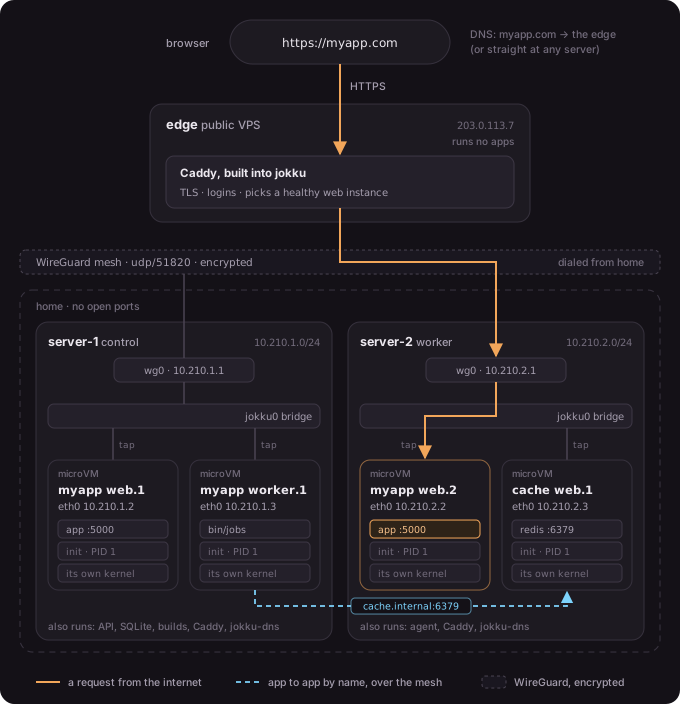
- DNS points at the edge. Or at any of your servers, if they're public. Every server runs the same Caddy that's built into Jokku, so any of them can take a request.
- Caddy handles TLS and checks the login, if the app has one. The control server keeps it up to date with the address of every healthy
webinstance of every app, and it picks one. - The mesh carries it home. Every server owns its own block of the cluster's private addresses,
10.210.2.xfor server-2, so an instance's address says which server it's on. WireGuard sends the request there, encrypted. If the instance is on the server that took the request, it skips the mesh entirely. - The server hands it to the VM. It comes in on
wg0, crosses the server'sjokku0bridge, and goes through a tap device into the microVM'seth0, where your app is listening on$PORT.
Apps talking to each other use the same mesh. Every server runs a small DNS server, jokku-dns, on its bridge, so when a worker on server-1 asks for cache.internal, it gets back the address of the cache app's instance on server-2. The answer only lives for five seconds, so the name follows the app through deploys and moves. Inside the VM it's just a hostname.
Data that survives a dead server
This is the part Dokploy taught me to care about. A database never moves without its disk.
A volume is a disk attached to one instance, and the app runs on whichever server has the disk. When you move it, with nodes:drain or storage:move, the disk is copied while the app keeps running, then there's a short pause for the last few changes. If its server dies, an app with a volume waits for that server to come back instead of starting somewhere else on an empty disk.
Volumes back up to any S3-compatible bucket: Tigris, S3, R2, B2, anything that speaks S3. Backups run every 15 minutes by default, they're encrypted with a key you keep, and they only upload the blocks that changed, so frequent backups cost very little. Backups also change what happens when a server dies: once it's been gone for five minutes, its backed-up volumes are restored onto another server from their latest backup, and their apps start there. A server that's only cut off from the rest stops those apps first, so you never end up with two copies of a database each thinking it's the real one.
Postgres, MySQL and Redis are built in too, each on a volume of its own and backed up from the moment it's created:
jokku db:postgres:create shopdb
jokku db:postgres:link shopdb myapp    # sets DATABASE_URL and restarts myapp
jokku top
jokku top is a live view of the whole cluster in your terminal: servers, apps, instances, CPU and memory. Press 6 and every request flies across its app's lane as a dot, green for fine, yellow for a 4xx and red for a 5xx, and lands on the instance and server that answered it. It's a ridiculous amount of fun for what is, technically, a list of HTTP requests.
Nights and weekends
Jokku has been my nights-and-weekends project for the last couple of months.
The first release was a big one. It was the foundation I'd been working on for a while: the control plane, the API every command goes through, Dokku's commands over SSH, and the installer, with git push into Firecracker microVMs right behind it. Everything since has been built on top of that: clusters, volumes, compose files, backups that restore themselves, databases, and most recently edges and logins. It's on v0.8.2 now, and what's new lists every release.
sudo jokku update updates a server in place. It backs up Jokku's own database first, puts the old version back if the new one won't start, and your apps keep serving the whole time.
It's early
Jokku says "early development" right at the top of its README, and it means it. A few things worth knowing before you point it at anything important:
- It needs KVM. Bare metal, or a VM with nested virtualization turned on. Ubuntu or Debian, on a CPU from 2011 or newer.
- The Firecracker jailer isn't on yet. Until it is, treat apps on the same server as trusting each other, the same as you would on Dokku.
- Some of Dokku isn't there. No buildpacks yet, so apps need a Dockerfile, a compose file or a registry image. No plugins, though what the common ones do is built in.
releases:rollbackis planned.
The command reference marks every Dokku command as works, planned, or not planned, so you can check before you switch.
Try it
Jokku is free. Everything is at jokku.dev: the install command, the docs, a page for coming from Dokku, and what's new in every release. The code is on GitHub.
If you already have a Dokku box, you already know how to use it. And if something breaks, open an issue.